Creating Facebook ads from scratch can be time-consuming and overwhelming, especially if you are unsure what works best.
In such situations, templates simplify the process by offering proven, standard formats designed for engagement and conversions. These are ready-to-use designs, using which you can save time, reduce guesswork, and focus on what matters: driving results.
Furthermore, Facebook ad templates give you proven structures that save time and improve performance. Instead of starting from scratch, you can customize layouts that already work.
This article provides 12 high-performing Facebook ad templates, with design layouts and key elements to include. You will also find examples you can copy and paste into Canva or Figma for effortless customization.
Let's get started.
TL;DR
- Feature spotlight and social proof templates work best for product launches
- Before/after and problem-solution templates convert well for services and apps
- UGC templates outperform polished brand creative by 2 to 3x
- Retargeting templates recover 10 to 30% of abandoned carts
- Match your template to campaign objective: awareness, consideration, or conversion
12 Facebook ad templates
Now let's dive into each template with layout guidelines, ad elements, copy formulas, and tips for making them work.
Template 1 - Feature spotlight
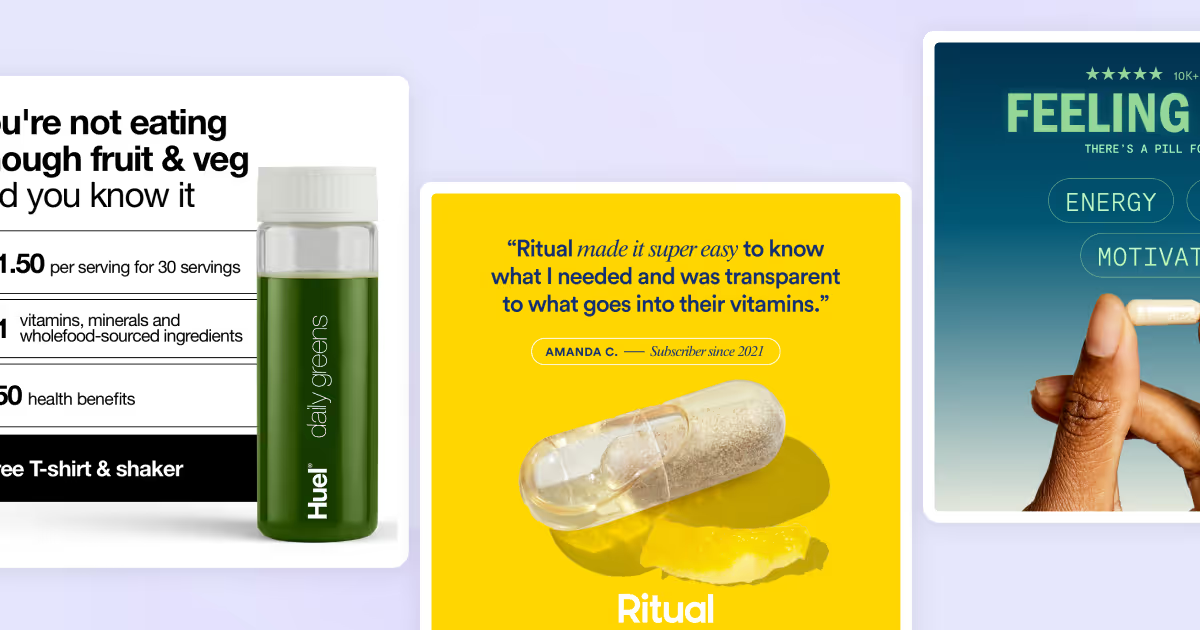
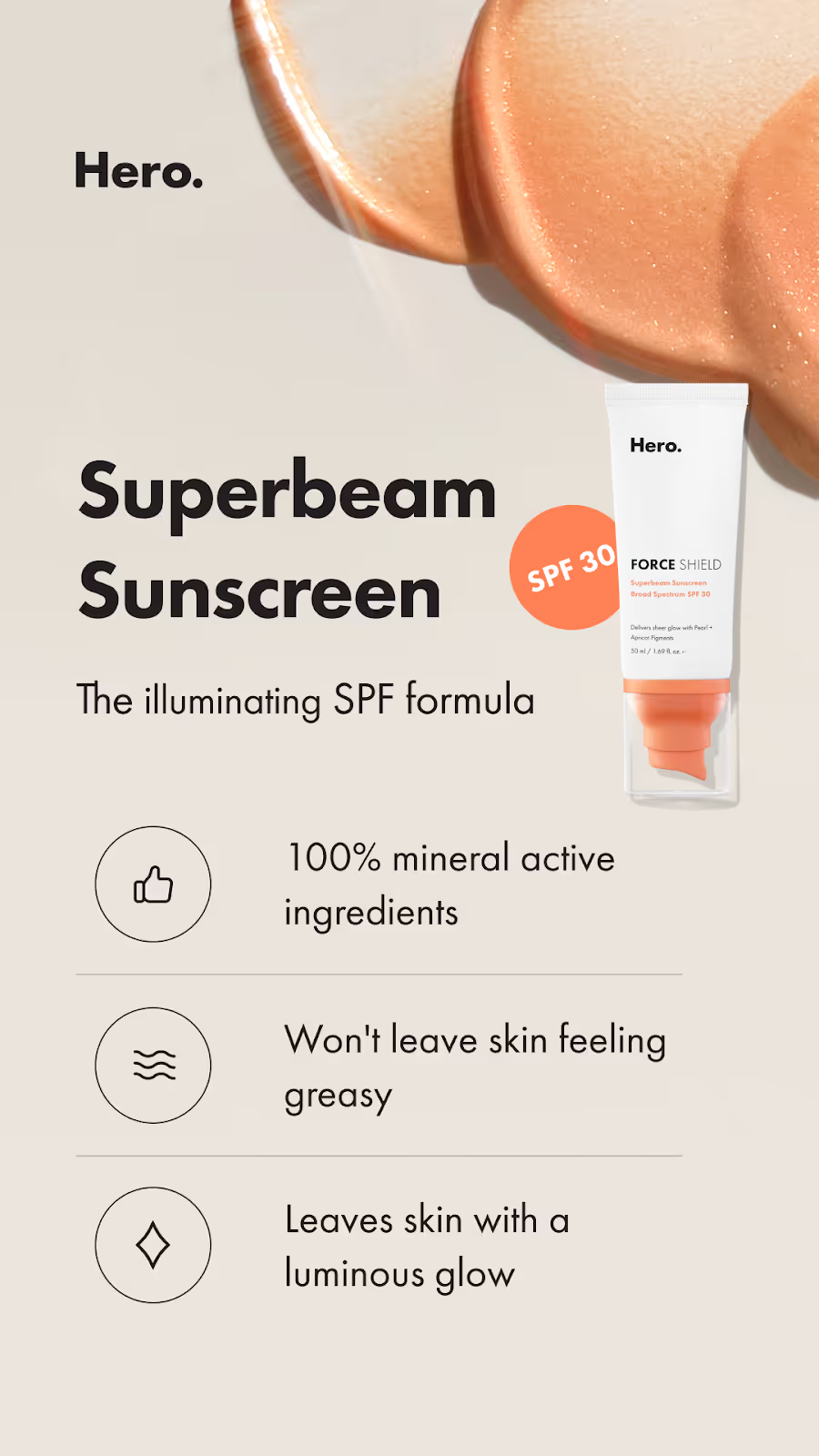
A feature spotlight ad showcases a product image alongside 3-5 key features, emphasizing its value at a glance. It’s ideal for various industries and products, such as e-commerce or SaaS. This format highlights functionality and benefits concisely, engaging users quickly. It’s perfect for explaining why your product stands out while keeping the focus on essential selling points.
Ad layout
Clean, minimalist product photo on a solid-colored background. Display around three standout features/benefits highlighted in large, bold text, ideally paired with numbers, icons, or visual elements.
Ad elements
- Image: Showcase a high-quality product image on a plain background that highlights its design or usage. List 3-5 key features or benefits with simple text and icons.
- Headline: "Experience the best of [product category] with [product name]!"
- Text: "Designed to [solve pain point/improve experience].
[feature 1]
[feature 2]
[feature 3].” - CTA: "Explore now"
Tips for this format
- Add a small company logo in corner for brand recognition.
- Make sure the focus is on the product image and key features. Leave plenty of white space or a blank background for visual impact.
- Add a simple icon or graphic element to emphasize the key features and make them visually understandable.
Feature spotlight ad example
Template 2 - Social proof showcase
Social proof ads build trust by showcasing user testimonials, ratings, or certifications from credible sources. This format leverages third-party validation, making it persuasive and effective on social platforms where authenticity drives engagement.
Ad layout
A high-quality product image that takes up 60% of the space. Customer testimonial overlaid in a readable font. Design the ad with a clean, minimal layout. Focus on a customer photo or product shot, paired with an authentic testimonial or high ratings to draw attention to credibility.
Ad elements
- Image: a happy customer photo, product image with a review overlay, or a badge showcasing ratings (e.g., "4.9/5 stars").
- Headline: "Join 10,000+ happy customers—limited time only!"
- Text: "I’m in love with [product]. It helped me [solve problem]!"
- CTA: "Learn more"
Tips for this format
- Add customer's personal information such as first name, title, and location for credibility.
- Always use authentic quotes—specific, relatable testimonials outperform generic praise.
- Include visuals like stars, badges, or customer photos to boost credibility.
Social proof ad example

Template 3 - Before & after
Split ImageThis is one of the most straightforward and effective ad formats. It visually highlights a problem and its solution, making it quick and easy to understand. It’s perfect for Facebook, where people spend less than a few seconds scanning; it grabs attention and communicates value in seconds.
Ad layout
Divide one image into two parts to show the transformation or results. The most common layout features the "Before" (or "Problem") scenario on the left side and the "After" (or "Solution") scenario on the right.
Ad elements
- Image: Use simple illustrations, icons, or product images to present the problem and solution.
- Headline: "Struggling with [problem]? See the difference in just [timeframe]!"
- Text: "[Short anecdote or testimonial]. Ready to transform? Try [product] risk-free."
- CTA: "Learn more"
Tips for this format
- Convey the problem and solution visually; don’t rely on long text explanations.
- Add a bold text overlay highlighting the transformation or the better result your product brings.
- Use high contrast, such as dark and bright color schemes, between sides to emphasize the difference.
Before & after ad example

Template 4 - Problem-solution
Visually shows the common problem in a relatable way, starting a dialogue with your audience. A problem-solution ad identifies a pain point your target audience struggles with and positions your product as the ideal alternative. This format builds relevance and trust, offering a clear path to resolution.
Ad layout
Use bold, contrasting colors to highlight the problem in the header and the solution in the text. Pair this with a clean product image to reinforce your message.
Ad elements
- Image: A relatable visual showing the problem (e.g., stressed person) paired with a clean product photo.
- Headline: "Frustrated by [specific pain point]? We’ve got the fix!"
- Text: "Say goodbye to [problem] with [product]. It’s designed to [unique benefit]—no stress, just results."
- CTA: "Try it now"
Tips for this format
- Make sure your product is positioned as the clear solution for the problem you address.
- Use arrows or visual cues to guide eye movement.
- Add a clear call-to-action button to create a smooth flow from problem to solution to the next actionable step.
Problem-solution ad example

Template 5 - Product comparison
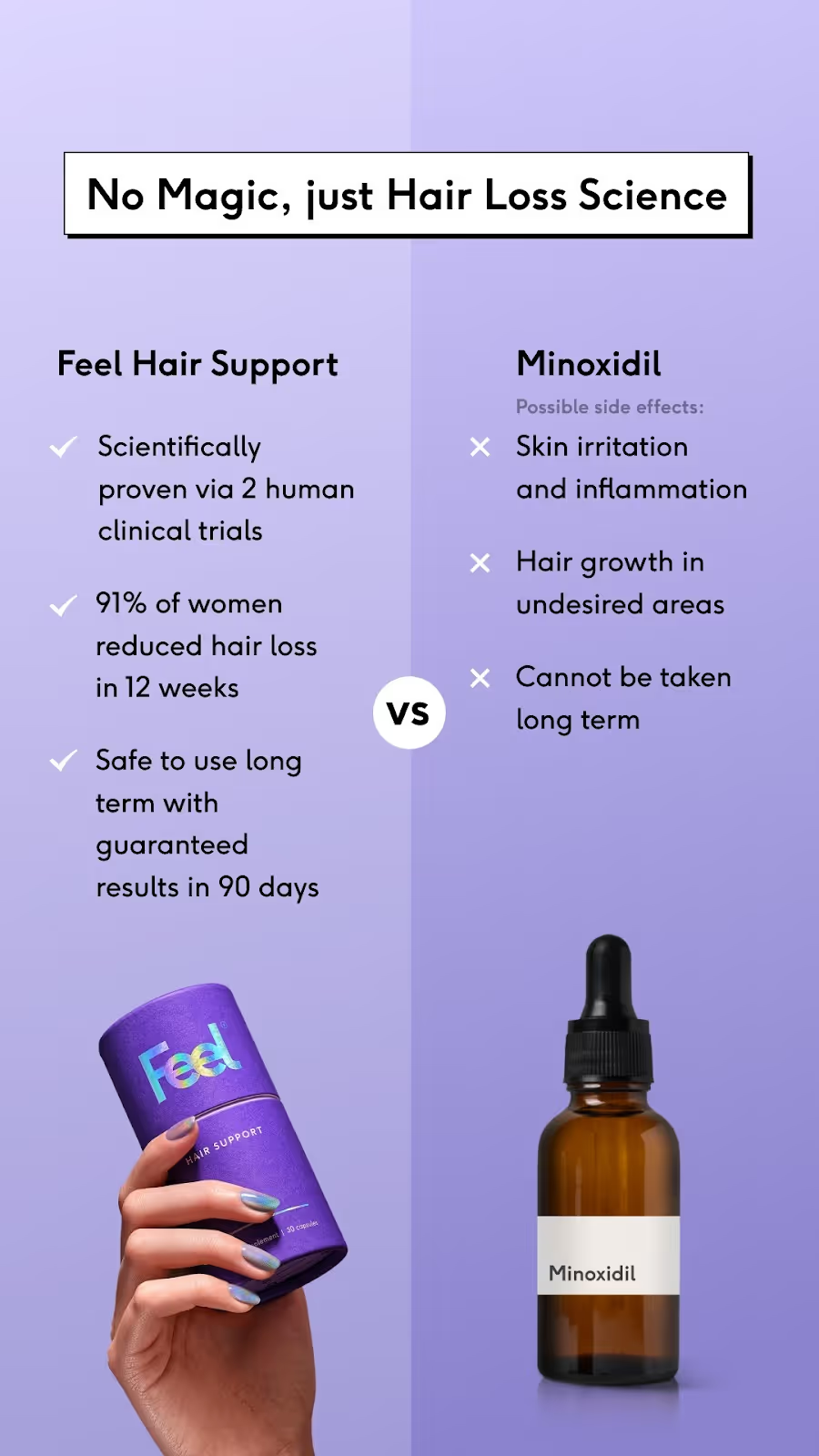
A comparison ad highlights the shortcomings of traditional solutions (or your competitors) on one side and the benefits of your product on the other. This clear, side-by-side format helps audiences quickly understand your product’s advantages.
Ad layout
Use a split-screen design: one side with dull, muted colors to represent the problem, and the other side with vibrant visuals showcasing your product as the solution.
Ad elements
- Image: A split image with the left side showing frustration or inefficiency, and the right side featuring your product in action or highlighting benefits.Headline: "Stuck with outdated solutions? Time to upgrade!"
- Text: Other [product]: " ❌ Slow, outdated, frustrating." [Your product name]: " ✅ Fast, innovative, hassle-free with [product]."
- CTA: "See the difference"
Tips for this format
- Keep the "existing solution" (or “other products”) side minimal and negative to highlight the contrast with your solution.
- Use icons or checkmarks to make benefits visually clear and easy to scan.
- Ensure the product image or benefit side feels dynamic and aspirational.
Comparison ad example
Template 6 - Controversial question
A conversational question ad starts with a big, bold question that addresses a common pain point. It grabs attention by directly engaging the audience, making them feel understood. This format is perfect for presenting solutions and driving clicks quickly.
Ad layout
Use a clean design with a bold question in a large, contrasting font. Pair it with a simple product image or a relatable scenario to focus attention on the solution.
Ad elements
- Image: A product image or a relatable lifestyle photo showing the pain point or desired outcome.
- Headline: "Are you still [struggling with problem]?!"
- Text: "[solution] is here to change the game. No gimmicks—just results."
- CTA: "See how it works."
Tips for this format
- Frame the question in a way that resonates emotionally with your audience.
- Ensure the answer or solution is clear and directly linked to your product.
- Use simple, bold visuals to keep the focus on the question and the product.
Question-hook ad example

Template 7 - Seasonal/Occasion-based ad
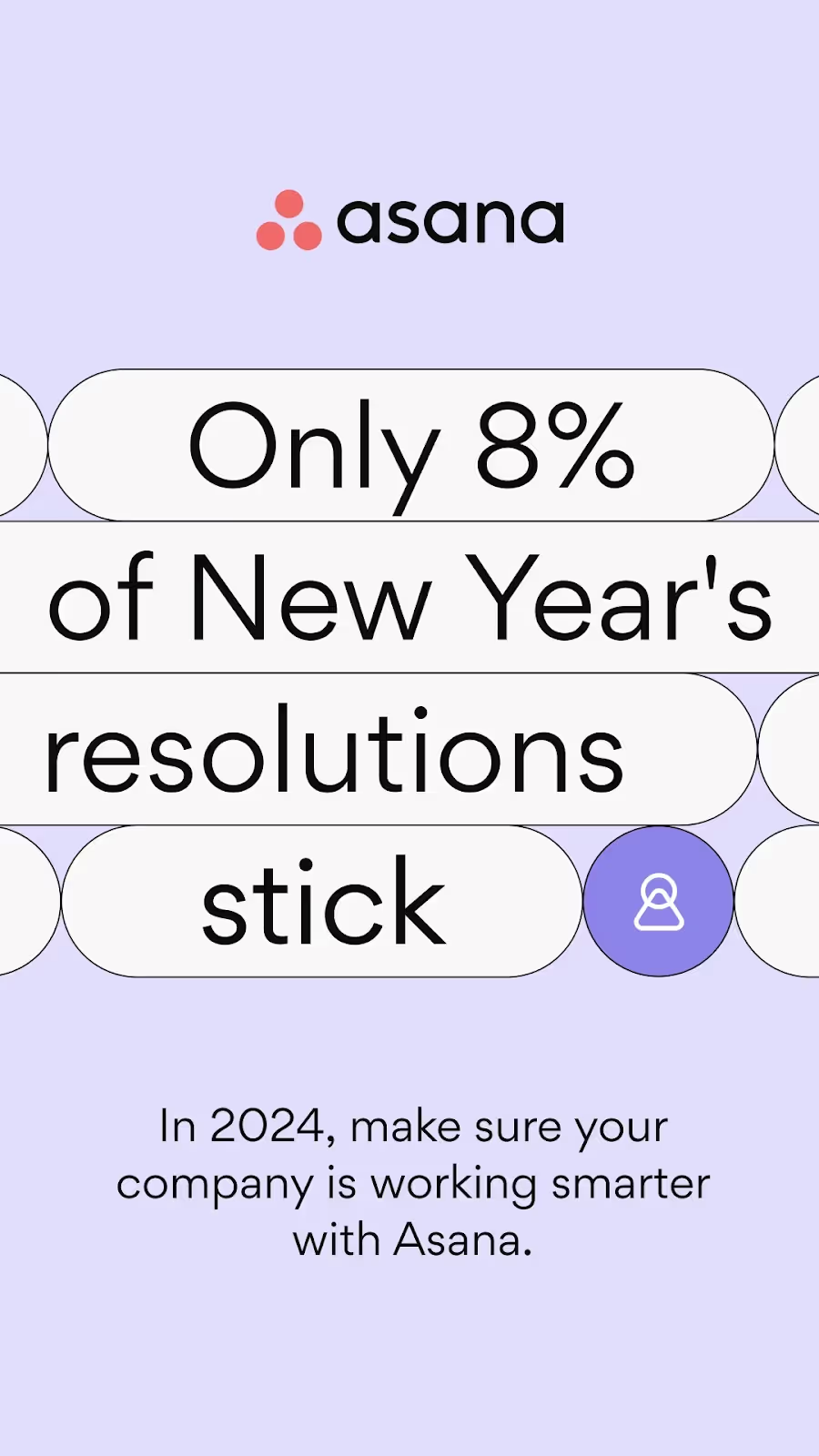
This ad format uses a bold, seasonal-themed question to challenge assumptions and spark curiosity. It’s perfect for grabbing attention during holidays, sales, or special occasions. Combining urgency with relevance ensures higher engagement and conversions.
Ad layout
Use bold, festive colors or seasonal imagery to tie in the occasion. Pair this with an attention-grabbing question as the headline and a clear CTA to drive action.
Ad elements
- Image: Use a big font for the seasonal theme header to catch attention, linking back to how your product is beneficial for the specific occasion. Include a visually striking seasonal photo or illustration with festive accents.
- Headline: "New Year, New [Problem to Solve]!"
- Text: "Start [Year] off right with [Product]. [Time-sensitive discount]—don't wait!"
- CTA: "Shop now"
Tips for this format
- Use time-sensitive language like "limited time" or "don’t miss out" to create urgency.
- Tie the product to the occasion with festive design elements and tone.
- Ensure the question sparks curiosity or highlights a common seasonal pain point.
Occasion-based ad example
Template 8 - UGC (user-generated content)
User-generated content ads feature real customers using or reviewing your product. This format feels authentic and relatable, which builds trust faster than polished brand creative. UGC-style ads outperform traditional ads by 2 to 3x in conversion rates because they look native to the feed and reduce the "this is an ad" resistance.
Ad layout
Feature a customer photo or video as the primary visual, taking up most of the frame. The content should look casual and unpolished, like something a friend might post. Overlay minimal text if needed, but let the authentic visual do the heavy lifting. Include a small logo in the corner for brand recognition.
Ad elements
- Image: A real customer photo or screenshot of a video testimonial. Avoid professional lighting or staging. Phone-quality visuals often perform better than studio shots.
- Headline: "See why [number] customers love [product name]"
- Text: "[Customer first name] from [location] shares their experience: '[Short quote about the product benefit].' Ready to try it yourself?"
- CTA: "Shop now" or "Get yours"
Tips for this format
- Always get permission before using customer content in ads. Reach out to customers who tag you on social media or leave positive reviews.
- Keep the aesthetic raw and authentic. Resist the urge to over-edit or add heavy graphics. The power of UGC comes from its realness.
- Include the customer's first name and location when possible. This specificity adds credibility and makes the testimonial feel genuine.
UGC ad example
.webp)
Template 9 - Video hook
Video hook ads are designed to stop the scroll within the first 2 to 3 seconds. They open with a pattern-breaking visual, bold statement, or surprising element that demands attention. Once you have the viewer's attention, the rest of the video delivers your message and drives action.
Ad layout
The first frame must be visually striking. Use bold colors, unexpected imagery, movement, or large text overlay. Design for sound-off viewing with captions throughout. Keep total length under 30 seconds for feed placement, under 15 seconds for Stories and Reels.
Ad elements
- Video: Opens with a hook (question, bold claim, or pattern-interrupt visual). Transitions to product demo or benefit explanation. Ends with clear CTA.
- Headline: "[Bold claim or question that creates curiosity]"
- Text: "Watch this if you've ever [relatable struggle]. We found a better way. [Brief product benefit]."
- CTA: "Learn more" or "Shop now"
Tips for this format
- Script your hook first. The opening 2 to 3 seconds determine whether anyone watches the rest. Test multiple hooks with the same body content to find winners.
- Add captions to every video. Over 85% of Facebook videos are watched without sound. If your message requires audio to understand, it will underperform.
- Use the 4:5 aspect ratio for feed to maximize screen real estate. Use 9:16 for Stories and Reels placement.
Video hook ad example
.webp)
Template 10 - Carousel storytelling
Carousel ads use 2 to 10 cards to tell a sequential story, showcase multiple products, or highlight different benefits. Each swipe reveals new information, keeping users engaged longer than single-image ads. The format works well for both e-commerce product showcases and SaaS feature breakdowns.
Ad layout
Design each card to work both independently and as part of a sequence. Use consistent branding across all cards (colors, fonts, style). Create visual continuity that encourages swiping, like an image that spans across cards or a numbered sequence. The final card should always include a strong CTA.
Ad elements
- Image: 3 to 5 cards recommended. Card 1: Hook or hero image. Cards 2-4: Individual benefits, features, or products. Final card: CTA with offer or next step.-
- Headline: Card 1: "[Main benefit or curiosity hook]"Subsequent cards: "[Feature/benefit 1]," "[Feature/benefit 2]," etc.Final card: "[CTA headline like 'Ready to start?']"
- Text: "Swipe to see [what they'll discover]. Whether you need [benefit 1], [benefit 2], or [benefit 3], we've got you covered."
- CTA: "Shop now" or "Learn more"
Tips for this format
- Lead with your strongest card. Most users see only the first card, so it must work as a standalone ad while also encouraging swipes.
- Tell a story across cards rather than just listing features. A narrative sequence (problem → discovery → solution → result) keeps users swiping.
- Use the final card strategically. Include your best offer, a summary of benefits, or a compelling reason to click now.
Carousel storytelling ad example
.webp)
Template 11 - Retargeting reminder
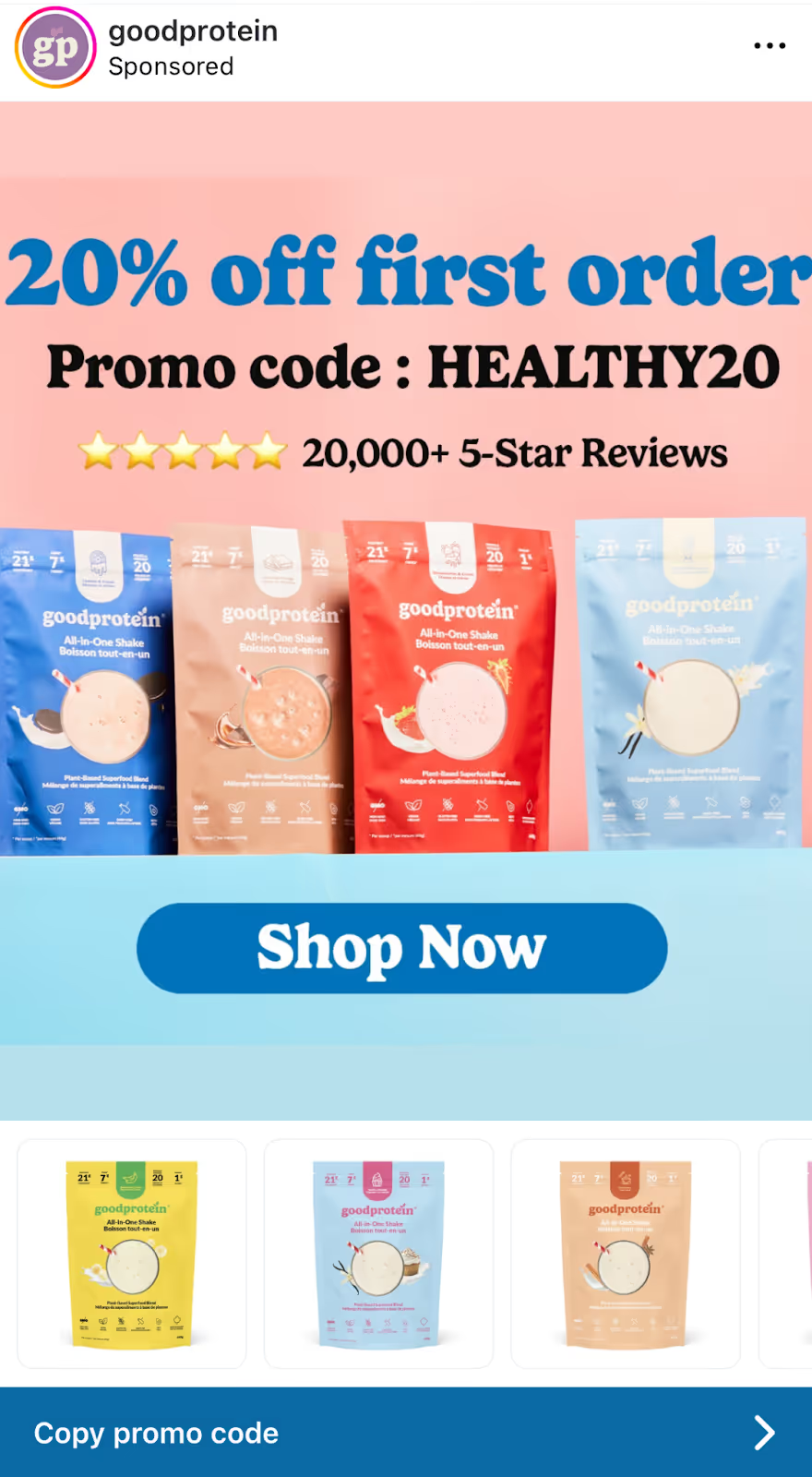
Retargeting reminder ads re-engage people who visited your site, added to cart, or interacted with previous ads but did not convert. These ads acknowledge the previous interaction and give a reason to come back. Retargeting typically recovers 10 to 30% of abandoned carts when done well.
Ad layout
Keep the design clean and focused on the specific product or offer they viewed. Use a simple visual of the product with a clear text overlay acknowledging they were browsing. Include urgency elements like limited stock or expiring discounts when genuine.
Ad elements
- Image: The specific product they viewed, or a curated selection from their browsing session. Clean background with minimal distraction.
- Headline: "Still thinking about it?" or "You left something behind"
- Text: "We noticed you were checking out [product name]. Good news: it's still available. Complete your order today and get [incentive if applicable]."
- CTA: "Complete purchase" or "Return to cart"
Tips for this format
- Personalize when possible. Dynamic product ads can automatically show users the exact items they browsed, which significantly improves relevance.
- Add urgency only when genuine. "Only 3 left in stock" works if true. Fake scarcity damages trust and can hurt long-term brand perception.
- Test different incentives: free shipping, percentage discount, bonus item, or simply a reminder without a discount. Not every abandoned cart needs a discount to convert.
Retargeting reminder ad example
Template 12 - Lead magnet offer
Lead magnet ads offer something valuable for free in exchange for contact information. This format works well for B2B, SaaS, education, and service businesses where the sales cycle is longer and building an email list supports nurturing. The key is offering something genuinely useful that attracts qualified leads.
Ad layout
Feature a visual representation of the lead magnet (ebook cover, checklist preview, webinar thumbnail). Use a clean, professional design that conveys value. Include a clear headline stating what they get and why it matters. The layout should make the offer feel valuable, not cheap.
Ad elements
- Image: A mockup of the lead magnet (PDF cover, toolkit preview, course thumbnail) or an aspirational image representing the outcome. Overlay text stating the offer clearly.
- Headline: "Free [resource type]: [Specific benefit or topic]"
- Text: "Get our [resource name] and learn [specific outcome 1], [specific outcome 2], and [specific outcome 3]. Over [number] [professionals/people] have downloaded it. Enter your email and get instant access."
- CTA: "Download now" or "Get free access"
Tips for this format
- Make the lead magnet genuinely valuable. Thin content that disappoints leads to damage to your brand reputation and reduces the likelihood of conversion later.
- Be specific about what they will learn or achieve. "Marketing guide" is weak. "The 5-step framework that generated $2M in pipeline for B2B SaaS companies" is compelling.
- Use Facebook Lead Ads to reduce friction. Pre-filled forms have completion rates around 13% compared to 2.5% for landing pages requiring manual entry.
Lead magnet offer ad example
.webp)
For more ad inspiration, check out MagicLibrary - we've got hundreds of wining ads that are there to look at for free!
{{newsletter}}
How to choose the right Facebook ad template
Not every template works for every situation. The right choice depends on your campaign objective, industry, and where your audience sits in the buying journey.
By campaign objective
Awareness campaigns introduce your brand to new audiences. Use templates that grab attention and communicate value quickly without asking for immediate action. Best templates: Feature Spotlight, Controversial Question, Video Hook.
Consideration campaigns help potential customers evaluate your product against alternatives. Use templates that educate, demonstrate results, or address objections. Best templates: Before & After, Problem-Solution, Product Comparison, Carousel Storytelling.
Conversion campaigns drive specific actions from warm audiences. Use templates with strong social proof, urgency, or direct offers. Best templates: Social Proof Showcase, Seasonal/Occasion, UGC, Retargeting Reminder.
Lead generation campaigns capture contact information in exchange for value. Use templates that offer something useful upfront. Best templates: Lead Magnet Offer.
By industry
E-commerce and DTC brands benefit most from visual templates that showcase products: Feature Spotlight, UGC, Carousel Storytelling, and Retargeting Reminder for abandoned cart recovery.
SaaS and software companies should focus on templates that communicate value and reduce perceived risk: Problem-Solution, Before & After, Product Comparison, and Lead Magnet Offer for free trials or demos.
Local services perform well with social proof and transformation templates that build trust: Social Proof Showcase, Before & After.
Education and coaching convert best with templates that sell outcomes: Before & After, Lead Magnet Offer, Controversial Question.
Facebook ad specs and dimensions for 2026
Before customizing templates, make sure your creative meets Meta's recommended specifications.
Image ad specifications
Video ad specifications
Carousel specifications
Carousel ads support 2 to 10 cards. Each card should be 1080 x 1080 pixels with a 1:1 aspect ratio. Each card can have its own link.
Text recommendations
Primary text should stay under 125 characters for full visibility without truncation. Headlines work best at 27 characters or fewer. Keep descriptions under 27 characters.
While Meta no longer enforces the 20% text rule, images with less text typically perform better in the auction.
Facebook ad copy frameworks
Great visuals get attention, but copy drives action. These proven frameworks help you write ad text that converts.
PAS (Problem-Agitation-Solution)
This framework identifies a pain point, amplifies the frustration, and then presents your product as the cure.
Structure:
- Problem: State the issue your audience faces
- Agitation: Make them feel the pain of not solving it
- Solution: Introduce your product as the answer
Example:"Spending hours on reports that no one reads? (Problem) Every week, you waste valuable time on busywork while strategic projects pile up. (Agitation) Our automated reporting tool creates executive-ready summaries in 5 minutes. (Solution)"
AIDA (Attention-Interest-Desire-Action)
This framework guides users through a psychological journey from awareness to conversion.
Structure:
- Attention: Grab them with a bold hook
- Interest: Share relevant information that engages
- Desire: Create emotional connection to the outcome
- Action: Tell them exactly what to do next
Example:
BAB (Before-After-Bridge)
This framework highlights the current painful state, the desired future state, and your product as the bridge between them.
Structure:
- Before: Describe their current situation
- After: Paint a picture of life after solving the problem
- Bridge: Position your product as the path from before to after
Example:
When to use each framework
Use PAS when your audience has a clear, specific pain point they are actively trying to solve. Works well for problem-aware audiences.
Use AIDA when introducing a new product or reaching cold audiences who may not know they have a problem yet.
Use BAB when selling transformation-based outcomes like coaching, education, or lifestyle products.
How much do Facebook ads cost in 2026
Understanding typical costs helps you set realistic budgets and evaluate campaign performance.
Cost benchmarks by metric
Costs vary significantly by industry, targeting, and season. Finance, insurance, and legal typically have higher CPCs ($3 to $5+) due to competition and high customer value. E-commerce and retail see lower CPCs but may need higher volume.
Budget recommendations by objective
Testing and learning: $10 to $20 per day allows you to gather data on what works. Run for at least 7 days before making decisions.
Small business campaigns: $20 to $50 per day provides enough volume for consistent lead generation or sales for local and small e-commerce businesses.
Growth-stage campaigns: $100 to $500 per day supports scaling winning creatives and testing new audiences.
Enterprise campaigns: $1,000+ per day enables full-funnel strategies across multiple audiences and placements.
Common budget questions
Is $10 a day enough for Facebook ads?
Yes, $10 per day can work for testing and small-scale lead generation. You will get roughly 500 to 1,000 impressions daily, enough to validate creative concepts. However, scaling results requires higher budgets.
Is $20 a day enough for Facebook ads?
$20 per day is a solid starting point for small businesses. You can expect 5 to 20 clicks daily, depending on your industry and targeting. This budget works well for local businesses, coaches, and early-stage e-commerce.
Is $1,000 enough for Facebook ads?
A $1,000 total budget (not daily) can support a 4 to 6 week campaign at $20 to $30 per day. This is enough to test 2 to 3 audience segments and 4 to 5 creative variations to find what works before scaling.
Best tools to create Facebook ad templates
Several tools make creating and customizing Facebook ad templates fast and affordable. We talked to the design team and the marketing team at magier and these are a few that they recommended
Design tools
Canva offers thousands of free Facebook ad templates with drag-and-drop editing. The free plan covers most needs, while Pro ($13/month) adds brand kits and background removal. Best for beginners and small teams.
Figma is a professional design tool with extensive template libraries from the community. Free for individuals, paid plans for teams. Best for design teams and agencies that need collaboration features.
Adobe Express (formerly Spark) provides free templates with Adobe's design quality. Integrates with other Adobe tools. Best for users already in the Adobe ecosystem.
PosterMyWall has over 3,500 Facebook ad templates with easy customization. Free with watermarks, paid plans from $10/month. Best for quick, high-volume template needs.
AI-powered tools
Jasper generates ad copy variations based on your product information and target audience. Useful for creating multiple headline and text options to test.
AdCreative.ai uses AI to generate complete ad designs optimized for performance. The platform analyzes what works and generates on-brand variations.
Marpipe automates creative testing by generating and analyzing multiple ad variations simultaneously. Best for brands running high-volume creative tests.
Research tools
Meta Ads Library lets you search any brand's active Facebook and Instagram ads. Free and essential for competitive research. See what creatives competitors are running and how long ads have been active (longer runtime often indicates better performance).
Conclusion
Facebook ad templates give you a proven starting point that saves time and improves results. Instead of guessing what works, you can customize layouts that have already been validated.
Choose templates based on your campaign objective and audience stage. Use Feature Spotlight and Controversial Question for awareness. Try Before & After and Problem-Solution for consideration. Deploy Social Proof and Retargeting Reminder for conversion.
Remember that templates are starting points, not final products. Test different hooks, offers, and visuals to find what resonates with your specific audience. The brands that win on Facebook are those who test continuously and refresh creative before fatigue sets in.
If you're looking for some extra help with designing your ad creatives, check out magier. They act like an extension to your marketing team and churn deliverables within 48 hours.
{{redirect}}
Frequently asked questions
Is $10 a day enough for Facebook ads?
Yes, $10 per day can generate results for testing and small campaigns. Expect 500 to 1,000 impressions and 5 to 15 clicks daily depending on your targeting. This budget works for validating creative concepts and generating leads for local businesses. For scaling e-commerce sales, you will likely need higher daily budgets.
What is the best program to create Facebook ads?
Canva is the most popular choice for creating Facebook ads due to its free templates, easy interface, and direct publishing to Meta. For professional design teams, Figma offers more advanced features and collaboration tools. Adobe Express provides another free option with quality templates.
Is $1,000 enough for Facebook ads?
A $1,000 total budget supports a meaningful testing campaign. Spread across 4 to 6 weeks at $20 to $30 per day, you can test multiple audiences and creative variations to identify what works. This budget is sufficient for small business lead generation or validating a new product before scaling.
Is $20 a day enough for Facebook ads?
$20 per day is a solid budget for small businesses and early-stage campaigns. You should generate 10 to 30 clicks daily, enough for consistent lead generation or small-scale e-commerce sales. Many local service businesses run profitable campaigns at this budget level.
What size should a Facebook ad be?
For feed ads, use 1080 x 1080 pixels (square) or 1080 x 1350 pixels (4:5 vertical). For Stories and Reels, use 1080 x 1920 pixels (9:16 vertical). Carousel cards should be 1080 x 1080 pixels each. Always upload the highest resolution possible for best quality.
How do I create a Facebook ad template in Canva?
Open Canva and search for "Facebook ad" in the template library. Choose a template that matches your objective, then customize colors, fonts, images, and text to match your brand. Download as PNG or JPG, or publish directly to Meta Ads Manager through Canva's integration.
What makes a Facebook ad template effective?
Effective templates share common traits: a clear visual hierarchy that guides the eye from hook to CTA, minimal text that communicates value quickly, high-quality images that stop the scroll, and strong calls to action. The best templates also match platform-native aesthetics so they feel less like ads.
How often should I refresh my Facebook ad creative?
Most advertisers see creative fatigue after 2 to 4 weeks of running the same ad. Monitor your frequency metric (average times each person saw your ad) and refresh creative when performance declines, typically when frequency exceeds 3 to 4. Having a library of template variations ready makes refreshing faster.